Saturday, August 09, 2008

New version of SleepTool for BBSB/Domia Lite

Crikey, it's been a little while since I posted - sorry about that - I'm still here honest.


This new version of SleepTool is a masterpiece of unfinished work, it does however now have code in it to support sending of BBSB/Domia codes to the BBSB Online Controller.

Reposting this due to broken links etc, code is included if you can still remember VB6 - enjoy.

Download ZIP of binary and VB 6 code.

I'd be interested in hearing from you if you've enhanced this or written any other Domia Lite code for other HA purposes.

Mart.

Friday, February 22, 2008

Update: BBSB Controller availability and Support..

I've had a few comments from readers about getting support for the BBSB Online Controller and related items.

I followed this up with Domia, and they confirm that they will respond within 24 hours on weekdays to e-mail support requests to 'Technical at SimplyAutomate .co .uk". - so if you have questions or issues with controllers , or the website service give that a try.

I'm also pleased to confirm that they tell me that the BBSB Controllers are only temporarily out of stock, and have not been pulled from their range ... hurray!

Monday, February 18, 2008

Domia Lite or Home Easy?

Further fuel to the rumour that actually B&Q's 'HomeEasy' range manufactured by Byron is actually spookily similar to Domia's Domia Lite range appeared today on Simply Automates new look online store:


On the left is the HomeEasy HE200 , On the right, is the new Domia Lite 'Timer' ...hmm.


New on the SimplyAutomate online store: http://www.simplyautomate.co.uk/acatalog/domialite.html is item above, it's twin the HomeEasy HE200 'Timer Remote', can be found here: http://www.homeeasy.eu/product2.php


Several people have posted on the net about them being similar, but I've not found any posts with lists of devices from the HE range that work with Domia Lite.... I'll keep looking, right up until I go to B&Q and pick up a few of the more interesting devices they have there...


On a more depressing note, I've been unable to find the famous BBSB Online Network controller mentioned in such a glowing light previously on the blog.

It appears that the controller (or rather all 4 flavours of it when it did exist) have been dropped from the SimplyAutomate store without trace, which I do hope isnt a sign that it's been axed from the Domia Range.... not good for us HA types, as we now have no way of talking to those lovely cheap Domia modules anymore 8-( ... or perhaps those nice B&Q Byron devices either.......

Saturday, February 02, 2008

Windows Home Server: What's inside..

I couldn't resist trying out Windows Home Server recently, so I sent off for the 180day eval DVD set and it arrived the other day.

Interestingly, a lot of the useful features are quite straightforward to implement on a normal Windows XP or Vista workstation, or on Linux if you're that way inclined.

A .homeserver.com Domain Name and SSL Cert.

Access to the server remotley is under SSL encryption in your browser, thanks to a server SSL Certificate.

Enabling internet functionality on the server results in your own SSL Cert being automatically provisioned by GoDaddy, and it would appear that its actually granted to the home-server DNS name you set up, and not just *.homeserver.com - interesting. More interesting is that my trial server dies in 179 days, but my free SSL cert will last until 2013 8-) -- ironically, this is of course tied to myservername.homeserver.com, and therefore it's impossible to pay a DNS provider for any .homserver.com DNS name anyway because MS own that - so no free lunch here 8-(


I'm also surprised that the product doesnt offer some sort of certificate based two factor authentication - say a private certificate based set of folders that would not open without password and installed certificate perhaps?

AV Protection

Nope! - a brave move for a product that is essentially based on Windows 2003 server with some changes, You will be asked to open ports 80, 443 and a few others to enable RDP to your clients on your home network. To leave this for any period of time without a supported AV product installed and working is not a smart move- especially with all your data loaded on there.

OneCare would have been a nice build-in for this, but clearly not. At the time of writing Avast! have a WHS aware AV product. -so there are options already.

X-Raid

I call it X-Raid, but there are other names for it, this is essentially a form of 'RAID' that creates redundancy by spreading your data, and (I'm assuming) parity for it around over the disks you have installed, despite them being different sizes - nice, though there have been many comments on the forums saying that the server 'balances' between disks all the time especially if you hit it with a heavy upload of files - I suspect a later patch from the mothership will set this up so it only happens at set time windows for example.

This is 'software' RAID whatever way you look at it, and it will never really compete with a hardware based controller with caching etc, that you find in commercial servers, and I wonder if a hardware option would be better given many OEM's have spun WHS dedicated hardware already...

I've yet to add more than a single disk to my WHS, so a more in-depth comment on this will arrive here later once, I've seen it at work.

Hacking already!

While at Tech-Ed I spoke to several MS staff regarding WHS and external network storage - many of us (including me) already invested in Home NAS devices (mine is a Synology CS107), which have redundant RAID on SATA disks already, and WHS's efforts are therefore less appealing to me - Sadly, MS told me a the time that there is no support for NAS'es, but as always, I set about working out how to share the folders on the NAS via the site regardless- my interest in WHS is remote access and backup primarily for now.

In actual fact , once you realise that a shared folder in WHS is resident on the D: drive of the server (your primary disk, 2nd partition if you have just the one ), and the neat folder interface is supplied by some ASP.NET in IIS on the machine, it becomes a little easier.

From what I can see, the actual interface shares the folder contents via some server-side code which cleary we probably cant force to show a non-local network share. (after all we're asking for 'share forwarding' something that windows cant do anyway).. except in IIS...

It is possible to create virtual directories in IIS to point to network locations, and this appears to work nicely as it does on any other windows IIS box.

Sniffing around in the iis folders gave away how to add some links to the WHS web page:

  • Set up a virtual directory in IIS pointing to your remote system, I selected 'always validate the authenticated users credentials' which uses the user you logged in as (make sure they have a matching username and pw on the remote server, or NAS)
  • Ensure you enable 'Read' and 'Directory Browsing' ,then click 'Directory Security' then click 'edit' and remove anonymous access! - select 'basic clear text auth' - if you enter via SSL I think you're encrypted anyway?
  • Copy WHS the c:\Inetpub folder somewhere as a backup, first before interfering..
  • Edit c:\inetpub\wwwroot\remote\default.aspx and locate the line with

if (Has3rdPartyWebsites)

<%if (Has3rdPartyWebsites){ %>

(remove it, along with the corresponding <%} %>bit as well at the next paragraph)

  • Edit c:\inetpub\wwwroot\remote\websites.aspx and add a few lines like this (one for each link)
  • Where 'name' is the link name, uri is the path to the virtual dir you created (I put mine under remote), and imageUrl points to something pretty - like the graphics in the images folder)

When you click the links you do get the ugly IIS folder list, but there are 3rd party apps to make this look nice, and I'm not giving up just yet on adding it to the folder tab in the main site 8-)

If you're listening MS: Remote storage (E.g NAS'es) would be a nice supported feature, especially if you then consider making the WHS an embedded device with LOW power consumption and no moving parts 8-)

More on WHS later as I'm not done, with 178 days remaining, though I must say all it's done is made me think that my 'unslung' Linksys NSLU2 (Which uses a 1/10th of the electricity of my WHS) is capable of most of the functions I need, I may need to explore this further - if I do I'll post what I've built - think 'embedded WHS' with Linux 8-)

We have to be mindful that WHS is targeted at the average consumer, and for that it's a great solution, especially looking at the fine examples from the OEM market (HP, Tranquil etc), I suspect the geek movement are busy as we speak moving features onto this platform ..

Friday, January 18, 2008

Network events from the BBSB controller!


Great news on the BBSB Online controller front -How to get controller events on your local Lan - something that has been a bit of a mystery to us.

Reader Marcus J has posted a comment on my earlier BBSB Online Review about how he set about writing his own software to control the BBSB controller device locally on his LAN. - While we'd already discovered how to 'control devices' by talking direct to the controller, he's cracked the event notification side which is even more useful , as the subscription BBSB online software which is currently able to send e-mails and Texts on events, but nothing that is extensible for those of us who want the events to go to our own apps and scripts.

Here's how:

Using a network packet analyser he discovered that whenever the device detects a RF signal it broadcasts a UDP packet to the broadcast IP of 255.255.255.255 with destination port of 53003 and the packet data is in format of "devicecommand:1e01:" for example where e1 has been turned on.

All you do is write a script or application to listen for udp broadcast packets on port 53003. :)

Marcus tells me this has enabled him to write his own macros to trigger other devices /emails/alerts etc whenever an event occurs.

He has also written a script plus php web front end to allow control of devices using a schedule all thanks to our earlier discovery on the URL format.

The script simply opens port 80 on the device and sends the necessary http header and url when a scheduled event occurs.
If this was facebook, I'd have bought you a virtual Pint Marcus! - well done.
If anyone else has any clever ways of making use of this little controller, feel free to let us all know using the comments link below.
Update
Yup, it's true - works like a charm - here's an updated SleepTool.exe, that can hear BBSB events from the controller on the network. It also has a simple way of mapping BBSB devices (switches, motion detectors - etc ) to executing stuff on your host PC so you can run an app when a detector is triggered etc - link to the code and binary. - Enjoy. (standard horrid-vb coding disclaimer applies 8-) ) - you can use this on multiple PC's to put them to sleep when you turn off the power, the app still supports all the functions of the previous version.
Also, when the controller is instructed by the BBSB website to turn on/off a device, Marcus's observation also applies - so a local packet with 'devicecommand:0A01:' is seen when the website turns off Device A1 for example. Finally, there looks to be some sort of heartbeat packet as well every 10-20 seconds, which contains all sorts of interesting stuff when the controller heart-beats to the BBSB mothership....

Sunday, January 13, 2008

Does your Media Center sleep through the night?


Mine does, but initially not the way I wanted it to.. so:

You'll all know that you can set the power management settings in Vista, and MCE2005 to Sleep/Hibernate your MCE PC when it's not being used, but this doesnt take account of 'fixed time events', like when you go to bed at night for example, and doesnt ensure that the MCE machine is 'awake' when you want it to be - like when you sit down to watch TV in the evening - of course if you have the right type of BIOS and motherboard you can wake it with the MCE remote..

Enter 'SleepTool' , another VB app, that this time is based on an excellent code sample from
coder iPrank on VBForums.com (post is here).

I've added a few lines of code to make it accept command line parameters, but essentially it's all his work - nicely done.
So, I now have a scheduled task on the PC at the time I go to bed in the evening that says:

SleepTool sleep 17:30

This sleeps the PC immediatley (unless it's recording!) and wakes it up ready for me when I sit down to watch TV in the evening. (If the machine is recording or playing the sleep request is over-ridden by MCE and the request has no effect)

You can also tell the machine to 'hibernate' by swapping 'sleep' on the command line for 'hibernate', and use a relative time from the sleep point - so

SleepTool Hibernate 300

will hibernate the PC for 5 hours from 'now'.

Hope this is of use to someone 8-)

A Little Home-Automation side-note. Our Domia Lite controller has had a firmware upgrade, and sadly has lost the ability for me to 'sniff' the events on the controller from it's local web-server. I currently have another nasty VB app called PingAction.exe (source/binary here if you want it), that I use on a scheduled event every 10 minutes - this pings the IP of my Slim Squeezebox and uses this to 'deduce' if I've gone to bed for the night or not (I turn off the Slim with the ByeBye Standby 'green switch' (See earlier blog post) - this is a very nasty crude way of 'telling' if I'm no longer wanting media center to be on - and the application then invokes the SleepTool to put it to sleep.

Domia (if you're reading) - this is plea for some public API's to your excellent web-based HA system and/or the controller itself- its great , but I'd love to be able to actually integrate some other software with it - currently I cant work out any other way! -- am I missing something?


Mart../

Wednesday, January 02, 2008

A critical Media Center process has failed

I dont usually rant on here, but this one has got me all annoyed.

My Vista Media Center machine has been in 'production' in the house for a good 5 months now, and apart from a few annoyances (see below), it's been relativley plain sailing.

Until the christmas hols that is:

  • Just when it was time to book in all the rubbish xmas TV recordings over the festive season, I got the ominous 'A critical Media Center process has failed' message.

If you search on the GreenButton, and other popular forums, you'll pretty much see that people are tearing their hair out on this one - everything from new motherboards to repeated rebuilds to try and get rid of it.

Now, being from a SW engineering background, I'm not sure who in the ivory tower decided it was a good idea to present this as a modal dialog to the end-user on the 10-foot interface, rather than log something useful in the event logs, or even (gasp) 'report' the issue and get a fix for it, but here is story from my perspective, and what it led to:

  • Recordings.xml was about 1.5MB, and had about 2 years worth of series recordings, in fact it was moved over from the MCE2005 machine using Ian Dixons 'MCEBackup' utility, which works really well.
  • Disk space was down to about 20GB free, on a 250GB drive
  • About every 30 minutes, usually when using the Recorded TV page the message appeared, and the machine stuttered for a few minutes, then came back to life.
  • A number of error logs appeared in C:\ProgramData\Microsoft\ehome (433 of them)
  • The machine started recording two scheduled shows, and then 'stuck' - the shows were (alledgedly) still recording the next day.

I dont understand what actually caused this, but I remedied with the following steps. If you want to actually keep all those series settings that you have booked in, then use Ian's MCEBackup utility to back them up before you continue.

  1. Stop "Windows Media Center Scheduler Service" and "Windows Media Center Receiver Service". Services
  2. Delete Recordings.xml , and Recordings.xml.bak from C:\ProgramData\Microsoft\ehome\Recordings
  3. Restart the "Windows Media Center Service Launcher" service
  4. Restore the recordings if you backed 'em up.

I skipped the restore, and booked the ones I wanted to keep in again using the keyboard, I suspect that 'series bloat' is more than a contributing factor here.

Now, I think we are looking at a number of bugs here Microsoft:

  • The recording disk space limit in the settings menu doesnt appear to work all the time - MCE went 'over' it's disk space budget, and when it's done this, it appears to refuse to delete shows that are old (which is the intended mechanism to make disk space)
  • 'Something' is going on with the Recordings.xml file - given that this is a fairly simple 'dump' of the booked in recordings I'm not sure what.
  • finally, the crash reporting on my machine doesnt appear to be reporting anything - I doubt that it has reported the 433 crashes to the mother ship - if this due to the nature of the issue, then I suspect it might not be hugely understood back in Redmond.

(one of the 433 crash reports)

[Crash Information]ReportVersion=2MainBinary=C:\Windows\ehome\ehRec.exeMainBinaryVersion=6.0.6000.16386 (vista_rtm.061101-2205)CrashTime=11/20/2007 22:54:41 UTCException=System.NullReferenceExceptionExceptionMessage=Object reference not set to an instance of an object.
[Stack Trace]IP=0x000001ad RecordingObjects.RecordingScheduleItem.get_AlternateAirings()+0x7A :0,0IP=0x00000166 RecordingObjects.ConflictManager.FixAlternateStates(RecordingObjects.RecordingScheduleItem item)+0x43 :0,0IP=0x00000055 RecordingObjects.ConflictManager.FixAlternateStatesOnStateChange(RecordingObjects.RecordingScheduleItem item, ehiProxy.DVRSTATE oldState, ehiProxy.DVRSTATE newState)+0x29 :0,0IP=0x000001b7 RecordingObjects.RecordingScheduleItem.StatePostTransition(ehiProxy.DVRSTATE oldState, ehiProxy.DVRSTATE currentState)+0x115 :0,0IP=0x00000166 RecordingObjects.RecordingScheduleItem.set_State(ehiProxy.DVRSTATE value)+0x9B :0,0IP=0x00000967 RecordingObjects.RecordingScheduleItems.ConsistencyCheck(System.Object state)+0x38E :0,0

Its a real shame that this particular issue is not well understood and patched already, as it may even be spreading like rot across the MCE Vista community (!).

So, my feature request for 2008, is that there be an update to Windows Home Server, that incorporates Media Center 'server side' functionality - so that the machine can be used as a media center via the new v2 Media Center Extenders - this way the MC becomes more 'appliance' like, there are less pathces and updates required (because there is less 'clag' on the machine), and it's therefore more stable... it will be interesting if this becomes a reality .. I suspect (as others do) that this will be a future version.. 8-(

Hey ho, roll on Feb 1st when we can get our hands on a Linksys DMA2100 extender.... 8-)

Wednesday, November 28, 2007

Do you have enough Cat5?

Like me, you might have sneaked a few CAT-5 cables into the walls when you were decorating, or maybe you've strung some across the loft to move your network from place to place.

You probably also thought, "Hey, I'll never need more than a couple will I?" - So did I , until I needed a 3rd to the same place for another device.
So, there is an easy answer here, put in a Switch, or a Hub. However, this is another Switch in your network, and it uses a few watts of power also.
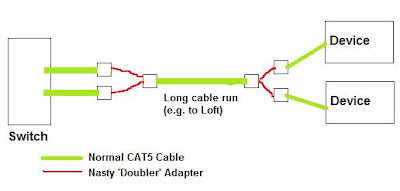
How about a nifty way of running two CAT5 100mbit connections across ONE CAT-5 cable?


What's the catch? - Well you can't use this hack if you're running Gigabit networking, as it's only good for 10mbit, or 100mbit.

How does it work? - No secrets here, 10mbit, or 100mbit ethernet only uses TWO pairs out of the four on the cable. Therefore if you create a couple of adapters you can feed two connections on one cable.

This technique is mentioned here in Wikipedia

Wiring

I wired up the RJ45 plug as a standard T568A cable - see here for the colours, and then used 2 keystone RJ45 sockets, wired like this (The pic is from above, with the socket 'holes' at the bottom.


If you have a RJ45 cable tester, use that to make sure you have 2 good pairs on each end (you'll need to plug the two 'plugs' together using an 'end-to-end' adapter, of if you're like me, you just went for it and connected it up. The resulting diagram explains what is going on here:
You can also (in theory), according to the Wikipedia article, use this for running 1 x 100mbit Lan, and up to two Phone Lines provided your phone lines only require 2 wires, or 4 if you run just one - Running Phone lines over this type of setup may be forbidden by your telephone company, so beware before starting on this for that reason - you will also be likely to get interference from the LAN signals on your phone calls due to the unshielded nature of the cabling.

DISCLAIMER: Please dont attempt this if you're not confident in making up CAT5 cables, I assume no responsibility or liability for any injury, loss or damage incurred as a result of any use or reliance on this information. 8-)

Sunday, November 04, 2007

Using AutoDVRConvert on Vista Media Center..

If you've followed my post below about Pete Tong living on my IPod, and you have a Vista Media Center, you'll be a bit stuck right now, because the steps using AutoDVRConvert dont work in the way described on Vista.

Never fear! - here's how to fix the conversion - it's not AutoDVRConvert at all that causes the problem, it's the LAME mp3 DirectShow encoder I linked to below.

Do the following from a command prompt, in the folder where you have all the files:

  1. regsvr32 /u lame_enc.ax
  2. delete lame_enc.ax
  3. download http://files.commo.de/lame_dshow397.zip ( the forum I found this link on is here: http://forum.doom9.org/archive/index.php/t-104234.html )
  4. Use the new lame.ax file inside the zip
  5. Register it: regsvr32 lame.ax
  6. Open GraphEdt and re-make your filter chain using the new version of the Lame encoder (it shows up as 'Lame Audio Encoder' in the list - If you have Lame MPEG Layer III Audio Encoder its the *wrong* one)
  7. Save your graph as it's GRF file
  8. Select the new GRF file in AutoDVRConvert and save
  9. test it.

Worked for me 8-)

Wednesday, October 31, 2007

Juice and Vista Media Center

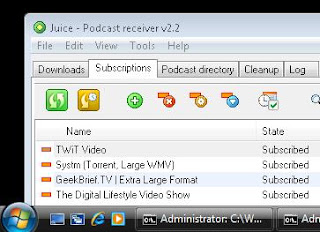
Juice, the popular podcast catching application works quite nicely on XP Media Center, but doesnt behave that well by default in Vista Media Center , as it was never written for Vista.


People keep asking me this, so here's the solution - having had to figure the last part out again because I forgot 8-) - it is possible to make it work just fine in Vista .. here's how:

Building on Chris Pirillo's helpful post here, here is how get the open source podcast catcher 'Juice' to work on Vista Media Center. This results in your podcasts arriving in the Shared Video folder in Media Center - meaning that Video Podcasts show up in 'My Videos' in Media Center:


  1. Run the setup as Administrator (or administration user)

  2. After installation *dont* start the application

  3. Go to c:\program files\Juice

  4. Set Juice to 'Windows XP SP2' compatibility mode in Explorer (right click)

  5. Go to c:\users\ in explorer

  6. Do Tools/Folder Options , 'Show hidden files and folders'

  7. Navigate to the now visible 'AppData\Roaming\iPodder' folder

  8. Edit ipodder.cfg in Notepad

  9. Change download_dir= line to remove the 'My ' from My documents

  10. Save the file and start Juice

  11. Go to File/Preferences

  12. Set 'Download Podcasts to this folder' to 'C:\Users\Public\Videos'

  13. Add your RSS video feeds 8-) and download.

  14. Enable General/At Startup only show Juice in the System Tray

  15. Click the Player tab and select No Player

  16. Save

  17. Select Tools Menu/Scheduler

  18. Set your favorite download time to whenever you want it to run

Your podcasts will now download automatically into Vista Media Center, and appear in folders under Videos on the main menu 8-) -- this happens regardless of what the enclosure is - if you add an MP3 feed , you'll get audio in there as well.


Friday, October 12, 2007

BBSB Office

Just as I'd pressed the submit button on the review below, look what Domia are launching at the E2 Energy Solutions Expo in London:

http://www.byebyestandby.co.uk/byebyestandbyoffice.html

This includes, from the initial information on the site above:

  • Some more 'secure' appliance modules
  • A different Remote
  • A 'PC' Service (perhaps similar to that described in my wishlist below) that can tell appliance modules to switch on and off (I think)

More news as I get it. 8-)

Wednesday, September 05, 2007

Bye Bye Standby ONLINE Review - Outsourced Home Automation anyone?

I've now completed this review, and re-posted it in one section so it's easier to read - enjoy.

I refer to Domia Lite and Bye Bye Standby (BBSB) in the same breath here - the devices are one and the same from a hardware standpoint, and cross-compatible.

Introduction

Domia have released the much anticipated 'bye bye standby online' controller - this little box , about the size of 1/2 a Netgear router plugs into your home network (e.g. like your PC) and , well, makes all your bye bye standby devices 'online enabled'.) - its really that simple.


The instructions supplied are 2 sides of A4, and to be honest , that's all you'll need. Plug it in and switch it on, then go to the site to register.

When I first got my hands on this, I couldnt believe how simple they have made this. I think anyone who wants to add a bit of 'remote control' to their home or office could easily handle this with *no* need for us propellor-head technical people (eek!)

What does it do?

      1. Lets you turn all your Domia Lite sockets on and off from the internet (and BBSB sockets because they're one and the same)

      2. 'reports' any Domia Lite events that it 'sees' - these might be motion sensors or switches to the website.

      3. Gives you simple, or sophisticated 'programming' ability on the site as well - you can make rules and group devices to create 'scenes' as well.

      4. Sends you e-mails or text messages if you want them when 'things happen'

      5. Lets you add web-cams to the site as well - so you can view them all in the same place.

      How does it work?

      (this gets a bit more technical)

      The controller connects to the BBSB online systems via your broadband connection, and sits 'heartbeating' with their site every 20 seconds, as well as listening for BBSB/Domia radio signals 'in the air' around your home.

      When you login to the site, you tell the site what your 'plug' address is - so this might be A1 for example, and once you've done this for any other sockets you have, you can control the sockets using 'buttons' on the site - the response time is almost instant, a few seconds at most.

      When something else in your home sends a compatible signal out -e.g. a wall switch, or motion sensor (these are the only Domia Lite sensors I could find on the web), the Controller 'hears' the signal and reports it up to the BBSB online system - this can cause emails, texts, or even trigger 'other' devices to switch on and off.

      This also includes being able to trigger sockets when a camera detects motion for example - but for this you need a web-cam that can ftp images to their website - for which you get a login during the configuration process.

      What does it cost?

      Currently, it's retailing for £49.95 inc vat here at domia's online store : http://www.simplyautomate.co.uk/productDisplay.asp?prodId=7384

      This includes a 30 day access subscription to the website - as it's a subscription service which you must maintain to get access to the website, though the controller appears to be operational without it - this is a groundbreaking, innovative way of getting HA to the masses, and you're going to have to pay for the service to continue beyond that.

      Controlling things locally using the controller, rather than the BBSB website

      About 5 minutes after I set the controller up, I read that the controller has a local web-site, which is similar to that of your home router, or other network connected device - like a wireless access point. You can use this to set a static IP address if you need one, see the firmware version, technical connection information, and access a 'control' tab which lets you manually control devices via the web-interface - it looks like this:

      While this is great, if you need to see if you've set the plug-modules up correctly - to the correct house and unit codes for example, its not easily scriptable to call from something else - unless of course, you view the page source and see what it's actually posting to the unit when you click the drop-downs 8-)

      Some direct / scripted contol can be had with a command line http command utility like wget:

      (the hostname of the controller is 'dlcmaster', then the 2 digits of the MAC address, therefore for a controller with '1a' as its selected 2 MAC address characters:

      'wget http://dlcmaster1a/4?3=1a01 - turns Device A1 ON
      'wget http://dlcmaster1a/4?3=0a01- turns Device A1 OFF


      There are also means for getting the log page from the controller to see what it going on in the house - note that it logs both signals it sends (e.g from the local page, above, or from the BBSB Website), AND signals recieved (like a remote switch) - You can get the log like this:


      http://dlcmaster1a/logsrc.htm


      I have no doubt that there are other interfaces to the unit over the network that are just hidden from view for now, and I've not investigated this further, because frankly, the online service is superb.

      There is bound to be support for the Harmony automation products communicating with the controller as well either already, or planned.

      I would be unsurprised too if we see a 'slim' version of Domia's Harmony neat Media Center UI being created quite rapidly by Domia (or by someone else) , to communicate with the BBSB Online service, or directly with the controller to give a 10ft experience to the automation control provided - this gives armchair control via the Media Center UI rather than the BBSB website.

      Domia have not attempted to hide this local interfacing mechanism, and many (like me) who like to tinker will be glad of it. I would be nice to see Domia publishing a network API to the controller that allows the attachment to the events in real-time- eliminating the need to 'poll' the controller to see what has happened - and/or some sort of web-service similar to that provided by Google Maps that allows developers to 'register' with Domia, and get an application 'key' to get access to some web-service API's on the main site ..

      Detecting 'changes' in status of devices using the controller
      My brain started ticking the other night as it often does - How about a cool PC software utility that runs in the background, listening for the 'BBSB OFF' switch - then shutting down your PC - if like me you dont put your PC on a BBSB adapter - (dont really want it 'dumped' when I leave the house because the power is cut off to it), but being able to have it 'detect' the BBSB button being pressed on a PC locally , could allow the PC to shut down / hibernate gracefully of it's own accord - Any voulenteers?! -

      I've not got the time to code that up currently, but it would be a useful little thing to have for a Media center for example - no point in that running all day when you're out, unless it's recording for example!


      The Good, The Bad, and the Ugly - What's cool, and what isnt about it.


      Good:

      • Price - controller and service are good value in my opinion.
      • Setup - your dad could do it without reading the manual (will test out on mine)
      • Flexibility of the subscription service - events, notifications etc
      • Price of the plug-adapters - About a tenner each (or pack of 3 with a remote)
      • No need for a dedicated PC or server to control everything
      • To my knowledge - unique (currently) in the marketplace

      Bad or Ugly


      No web-site API (yet) I'd like to be able to 'tell' the service to do stuff externally - like raise my own events to it - this isnt detracting from the paid for service, but adding to it - I'm sure the HA community will find a way, but it would be nice for us to have the official info!

      Security 8-( Domia Lite, like X10 RF is not secure, and with only 8 house codes, and 8 device codes - your neighbour (or anyone outside with a remote) will quickly make a disco out of your house lights and table lamps if they want to - X10 RF suffers from this too, I would imagine it would not be that hard to make the more Domia house codes - perhaps that rotary selector could be a 8 way dip-switch so you could select an 8 bit house code rather than a '1' bit one. -- X10 is exactly the same, so Domia are not alone in this issue.

      Expandabilty of modules: This is a double edged sword - there are quite a few devices for the average home user, but anyone who wants to wire in switches, or sensors or devices into the system they already have is all alone with their soldering iron , hacksaw and a keyfob transmitter to make their own transmitter (!)

      All the current Domia Lite modules work fine with BBSB Online, Currently there are: -

      • Two models of plug-switch, a plug-in dimmer ,
      • Two 'wired' lamp/appliance modules
      • A wall switch and a wall dimmer switch
      • An IR motion detector,
      • Two types of keyfob remote

      There's no expandable or 'hobby' module(s) with a couple of contacts on to wire up to a doorbell push, other sensor, or device - and there's no 'general purpose' hobby contoller device that could switch an external low-voltage load - perhaps the wired appliance module could, but it may need 240v for example to power the reciever, rather than a battery.


      One trick pony?: Domia make an X10 RF version of the controller, which sells for a little more than the BBSB/Domia Lite version - this from the look of it will work identically, and also allow you to have it on the same BBSB Online account as a BBSB/Domia Lite Controller - I dont have an X10 version to hand , but I cant imagine that the two models internals are 'that' different that a 2nd unit is really required to have X10 and Domia - couldnt one unit (costing more) do both protocols??? - (similar to http://www.rfxcom.com/receivers.htm) - I'm sure customers would pay more for a multi-protocol interface ??

      What about all my other RF devices? This also brings me to the other side of the RF protocol situation here - I counted 3 other manufacturers 433mhz RF devices in my home today, - I even have an alarm system that uses wireless 433mhz detectors - Currently no-one in the industry has acheived true cross platform integration with these 3rd party devices - with the exception of RFXCOMM (link above) - Perhaps Domia might consider making the controller able to receive and send unsupported protocols? - Using the BBSB Online website system to do the 'work' in decoding them - this would allow the site to 'learn' other device protocols and be able to read and write to other manufacturers devices without needing to update controller firmware -

      I dont really want to be removing my existing wireless alarm PIR detectors to replace them with Domia ones, but would *pay* domia for a service that can 'understand' the signals from the system and allow me to generate alerts/events from the ones I have!

      Then there's my RF Doorbell, RF Outside wireless weather-station , and RF Electricity consumption monitor ... all these devices are just 'begging' to be integrated with a system like this.

      Feature Wishlist?

      In no particular order, most of these are expensive investments in hardware manufacturing, and may not be the way Domia are planning on going, but hey, my blog, my poetic license:

      Design a 2-way 'uber' controlling module: Many HA appliance/dimmer modules are 'one way' - you have no way to telling IF the light is really on , or if the appliance connected is 'really' on - someone might have turned it off at the lamp stand for example, of the bulb may have blown.

      If you're managing your home remotley, it would be good to 'know' that something is really 'on' if it says its 'on' - this could be achieved by a more expensive 'two' way module, with a device to measure current in it as well - this could be perhaps added to the system at a higher cost - meaning that users could mix lower cost interfaces with the higher cost two-way one - the website could say 'OFF', 'ON', and 'ON and drawing current' - handy for security purposes for example , and you could calculate your energy usage from it too!

      Make the controller 'hear' and 'speak' other RF433 mhz protocols (See above)

      Make some General Purpose 'hobby' sensor and control modules - Many possibilities exist here depending on hardware, but a the basic level a version of the single channel remote, with two terminals to connect other switches to, and a similar version of an appliance module that can connect two terminals together perhaps?

      Put in some more security - Again, this could be simply making more house-codes (ones with say 5-8 bits that can be on or off, right up to having a 'learning in' process for sensors and modules meaning ones that are not 'learned' are ignored.

      Conclusion: Great system, has all the promise - lets hope Domia takes it beyond the limitations of X10 and other similar systems to become more pervasive in the consumer and hobbyist marketplace before someone else beats them to it - way to go Domia!

      Mart.