Monday, May 18, 2009

iPeng for IPhone and SqueezeCenter

Do you like the idea of multiroom audio, Sonos or Squeezebox Duet?

(Image: http://penguinlovesmusic.de/ )
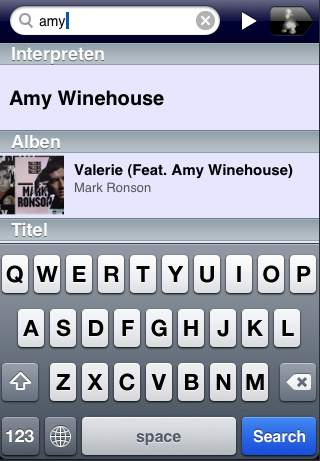
Well, if you have one (or more) squeezebox players, and an iPod Touch/iPhone, how about iPeng?

This little £5.99 iPhone app by Coolio is actually more pretty than the Squeezebox Duet remote, and if you have a iPod touch or iPhone works really nicely over your WiFi connection - it even 'finds' your slimserver automatically and doesnt need setting up.

Nicely done Coolio.

Update: Squeezecenter on Synology CS407

Our music library is quite large, and is slowing down our Media Center PC as it lives on our home NAS. I just moved SlimCenter to our Synology CS407 NAS where our music lives for better performance.

If you want to get IRBlaster (see below) to work on the Linux/Synology version of SqueezeCenter, then there are a couple of spookily similar little tweaks required:


IRBlaster will give the 'unable to write file' message in the IR learning app (just as it does in Windows), to fix do this:

  1. Download and install the latest Synology firmware (we're running DSM 2.1-0844)
  2. Download and install the SqueezeCenter for Synology.
  3. Telnet/SSH to your Synology (after enabling Telnet/SSH in the web gui.)
  4. cd to /var/packages/SqueezeCenter/target/Plugins
  5. create a new folder there (mkdir IRBlaster) - note case
  6. grant world-write permissions to the folder (chmod 777 IRBlaster)
  7. Try the IRBlaster learning app again, and you should find it worked!

The CS407 isnt the fastest embedded Linux box, but SqueezeCenter runs just fine - when installing plug-ins and re-scanning the music library it does groan a little under the strain, and SqueezeCenter stopped a couple of times, but once scanned, it's working just cool.

Tuesday, May 05, 2009

Taming the Logitech Squeezebox - Controlling your amplifier!

Some time ago Logitech launched the excellent Squeezebox Duet multiroom capable audio system. Naturally, I bought one seeing as I was already very impressed with the Squeezebox 3.
Now, if you have dribbled over the Multiroom Sonos audio system, one of the things you can do with this system (and more expensive built-in systems), is start/stop and control music in any room where there is a player - for the guys at Logitech, they got so close to doing this, but with one exception - There is no amplifier onboard the Squeezebox 3 (The Boom device has a built-in amp of course) - In the GadgetMan's house there was nothing but silence from the Squeezebox in the dining room, because the Amplifier wasnt switched on - authough with the Squeezebox Duet controller, you have complete control over the player in another room, you still had to run in there and turn on the Amp.. GRRR.

Now it turns out that Logitech did think of this - the headphone jack on the back of the Squeezebox2 and Squeezebox3 doubles as an IR Sender port, but they didnt actually provide the entire solution, that honour goes to Felix Mueller for the IRBlaster plug-in for Squeezecenter.
We got this up and running in 2 minutes on our Squeezebox3, sadly the Duet headless-player, doesnt support being an IRBlaster, so a more innovative solution for that is required (Felix actually has a 'Power Switch' circuit for devices like this as well if you care to try.


Here's how we did it - with a couple of tricks to make it work because we probably didnt read the instructions, or used Windows instead of Linux 8-/
  1. Find a compatible IR Transmitter with a 3.5mm plug on it - we used that free one that you get with the Microsoft Media Center Remote Reciever, that you probably threw somewhere because you werent using a set-top-box - it plugs right in and works.
  2. Download the IRBlaster plug-in (its listed in Squeezecenter on the add-ins page)
  3. Download IRBlaster again from the site above (I had to unzip it to C:\Program Files\SqueezeCenter\server\Plugins
  4. Add your slimcenter 'user' as 'full control' on the C:\Program Files\SqueezeCenter\server\Plugins\IRBlaster folder (otherwise you wont be able to create IR Profiles
  5. Restart SlimCenter
  6. Go to the plug-in in the settings page, and start the IRLearning Wizard - from there you can teach your squeezebox the IR commands for your Amp - we used Power On/Off and Vol+/Vol-, which worked first time on our Denon amp.

Sonos, move over! (a bit, cos clearly you're better, obviously).

Sunday, March 01, 2009

New version of SleepTool with BBSB V2 Support

If you have one of those nifty ByeByeStandby online controllers, you may have upgraded it to the new V2 firmware, or just bought it with that on.


Here's a new version of my SleepTool system-tray utility, this version has BBSB V2 support, so you can now send your PC to sleep with a BBSB V2 controller.

As ever, please dont use this as a shining example of how to code in VB6, the code quality in here is shameful but functional 8-) - it also seems to work fine in Windows 7 - though you may need to download the setup kit for VB6 apps to get the required .ocx files etc.

Download SleepTool v1.0.27 Here - source code included.

Enjoy

Mart.

Monday, January 05, 2009

Is this the Treos last stand?

Shiny newish htc s620 has arrived. Treos meet your ebay maker.

Sent from my Windows Mobile® phone.

Saturday, October 25, 2008

Taming the Linksys DMA2100

We aquired a DMA2100 a couple of months ago to replace our CAT-5 S-Video boxes, for some increased picture quality- it's an impressive little unit, but there are some issues..

There have been a number of posts on the GreenButton here that indicate that MS/Linksys didnt really think through the real-world behaviour of people's extenders and their MCE machines.

If your MCE machine goes to sleep between recordings (this is a good idea, as most PC's are 200w of your electicity bill all the time they're on), or because of a timed sleep due to inactivity, the extender has trouble 'waking' it again when you want to watch TV. We leave our DMA2100 on all the time (because it takes about a minute to start up when the power comes on)

This hit me with a couple of issues

1) The extender can't wake the PC (WOL doesnt work, but a directed 'ping' wake-up is supposed to) - but didnt work for our MCE machine. I solved this by using a Perl script on my Linksys NSLU2 linux box which is in an earlier post below.

2) Once the MCE machine was being woken when the TV was being switched on, we still had the issue that the extender didnt 'notice' that the PC was now on- and sat at the useless 'Extender Disconnected' screen - not very transparent.

The above issue is solved by simply pressing the 'Start' button on the MCE remote, this is handy because if the extender is at the disconnected screen ,or at the main menu, it 'just connects' if the PC is on, and also if it's already connected it takes the extender back to the main MCE menu each time.

We use a Harmony 525 Intelligent remote, and this can even be taught to 'send' a 'Start' key when the TV is powered on - the result is that the MCE home screen greets us every time the TV is powered on to watch TV... Perfect 8-)

So Linksys? how about a firmware update with proper Wake-On-Lan support? - and hey, while we're at it , how 'bout 'polling' that MCE machine on the network to see if it's there, and restarting the extender session?

Oh yes, then there's that irritating BRIGHT BLUE LED on the front - but black masking tape soon solves that one 8-)

Monday, September 08, 2008

WakeUpTool (!) - Waking up your PC's with Domia Lite or BBSB Network Controller

If you've been reading closely, you'll have discovered an application on my blog for 'Sleeping' PC's on reciept of a configured Domia Lite / BBSB device code or event. Well, for some time, I've been pondering a solution to the other problem - that of 'waking up' PC's according to a Domia Lite command.


Now, you could take the brutal approach, and put a Domia Appliance Module on the power feed for your PC, but this would effectivley 'dump' the machine when the signal was recieved, though it would quite nicely wake (or boot) the machine when turned on, if you have a BIOS that supports power-on boot-up. (good luck with your data integrity on that one)

Here's a more elegant solution:

You can use Wake-on-Lan (WOL) to do this, but in order to do that, you need something that can send the WOL magic packet on reciept of a DLC code. Now, one day, Domia might add this to their controller (after all it's on all the time, and on the network) (hint hint hint domia), but until then, here's a perl script that you can run in the background on a Linux machine or device that will do the same job.

#!/usr/bin/perl -w

use strict;
use IO::Socket;
use Sys::Syslog qw( :DEFAULT setlogsock);

my($sock, $oldmsg, $newmsg, $hisaddr, $hishost, $MAXLEN, $PORTNO);
$MAXLEN = 1024;
$PORTNO = 53003;
my $programname = 'dlc.pl';
$ENV{PATH} = "";

$sock = IO::Socket::INET->new(LocalPort => $PORTNO, Proto => 'udp')
or die "socket: $@";

logit('info',"Listening on Port $PORTNO for Domia Lite Messages..");
print "Awaiting UDP messages on port $PORTNO\n";

while ($sock->recv($newmsg, $MAXLEN)) {
my($port, $ipaddr) = sockaddr_in($sock->peername);
#$hishost = gethostbyaddr($ipaddr, AF_INET);
print "Recieved DLC Command `$newmsg'\n";
logit('info',"Recieved DLC Command: $newmsg");

if ($newmsg eq "devicecommand:1a01:")
{
logit('info',"Waking PC..");
print "waking up PC.\n";
system("/sbin/wakelan -m 0123ABCDEF11");
}

}
die "recv: $!";

sub logit {
my ($priority, $msg) = @_;
return 0 unless ($priority =~ /infoerrdebug/);
setlogsock('unix');
# $programname is assumed to be a global. Also log the PID
# and to CONSole if there's a problem. Use facility 'user'.
openlog($programname, 'pid,cons', 'user');
syslog($priority, $msg);
closelog();
return 1;
}

Once you're up and tested (replace 0123ABCDEF11 with your PC's MAC Address, and correct the DLC code - example above uses A1 ON), you can add this to your boot-up so it runs in the background by appending the line

/wherever/dlc.pl & 2 >/dev/null

(dont forget the ampersand &, as your box will not complete it's boot up scripts.. like I did)

Now, clearly if you run a 150w PC all the time with this, then it kind-of defeats the point of all this, but some small embedded linux device, like a Router, or Unslung Linksys NSLU2 can do the job just nicely.


Stay tuned for some more postings in Perl, as we build a Home Automation controller out of that handly NSLU2 that takes a whole 2watts of power 8-)


Sunday, August 17, 2008

Another new build.. SleepTool 1.0.23

Oops, dumbo bug in the last build, meaning that if you wanted to send DLC commands from the application, you needed to specify your device codes with a trailing Zero.

Oops. Fixed in this build - thanks to StephenN for pointing out that it didnt work in the previous 1.0.22 build.

Saturday, August 09, 2008

New version of SleepTool for BBSB/Domia Lite

Crikey, it's been a little while since I posted - sorry about that - I'm still here honest.


This new version of SleepTool is a masterpiece of unfinished work, it does however now have code in it to support sending of BBSB/Domia codes to the BBSB Online Controller.

Reposting this due to broken links etc, code is included if you can still remember VB6 - enjoy.

Download ZIP of binary and VB 6 code.

I'd be interested in hearing from you if you've enhanced this or written any other Domia Lite code for other HA purposes.

Mart.

Friday, February 22, 2008

Update: BBSB Controller availability and Support..

I've had a few comments from readers about getting support for the BBSB Online Controller and related items.

I followed this up with Domia, and they confirm that they will respond within 24 hours on weekdays to e-mail support requests to 'Technical at SimplyAutomate .co .uk". - so if you have questions or issues with controllers , or the website service give that a try.

I'm also pleased to confirm that they tell me that the BBSB Controllers are only temporarily out of stock, and have not been pulled from their range ... hurray!

Monday, February 18, 2008

Domia Lite or Home Easy?

Further fuel to the rumour that actually B&Q's 'HomeEasy' range manufactured by Byron is actually spookily similar to Domia's Domia Lite range appeared today on Simply Automates new look online store:


On the left is the HomeEasy HE200 , On the right, is the new Domia Lite 'Timer' ...hmm.


New on the SimplyAutomate online store: http://www.simplyautomate.co.uk/acatalog/domialite.html is item above, it's twin the HomeEasy HE200 'Timer Remote', can be found here: http://www.homeeasy.eu/product2.php


Several people have posted on the net about them being similar, but I've not found any posts with lists of devices from the HE range that work with Domia Lite.... I'll keep looking, right up until I go to B&Q and pick up a few of the more interesting devices they have there...


On a more depressing note, I've been unable to find the famous BBSB Online Network controller mentioned in such a glowing light previously on the blog.

It appears that the controller (or rather all 4 flavours of it when it did exist) have been dropped from the SimplyAutomate store without trace, which I do hope isnt a sign that it's been axed from the Domia Range.... not good for us HA types, as we now have no way of talking to those lovely cheap Domia modules anymore 8-( ... or perhaps those nice B&Q Byron devices either.......

Saturday, February 02, 2008

Windows Home Server: What's inside..

I couldn't resist trying out Windows Home Server recently, so I sent off for the 180day eval DVD set and it arrived the other day.

Interestingly, a lot of the useful features are quite straightforward to implement on a normal Windows XP or Vista workstation, or on Linux if you're that way inclined.

A .homeserver.com Domain Name and SSL Cert.

Access to the server remotley is under SSL encryption in your browser, thanks to a server SSL Certificate.

Enabling internet functionality on the server results in your own SSL Cert being automatically provisioned by GoDaddy, and it would appear that its actually granted to the home-server DNS name you set up, and not just *.homeserver.com - interesting. More interesting is that my trial server dies in 179 days, but my free SSL cert will last until 2013 8-) -- ironically, this is of course tied to myservername.homeserver.com, and therefore it's impossible to pay a DNS provider for any .homserver.com DNS name anyway because MS own that - so no free lunch here 8-(


I'm also surprised that the product doesnt offer some sort of certificate based two factor authentication - say a private certificate based set of folders that would not open without password and installed certificate perhaps?

AV Protection

Nope! - a brave move for a product that is essentially based on Windows 2003 server with some changes, You will be asked to open ports 80, 443 and a few others to enable RDP to your clients on your home network. To leave this for any period of time without a supported AV product installed and working is not a smart move- especially with all your data loaded on there.

OneCare would have been a nice build-in for this, but clearly not. At the time of writing Avast! have a WHS aware AV product. -so there are options already.

X-Raid

I call it X-Raid, but there are other names for it, this is essentially a form of 'RAID' that creates redundancy by spreading your data, and (I'm assuming) parity for it around over the disks you have installed, despite them being different sizes - nice, though there have been many comments on the forums saying that the server 'balances' between disks all the time especially if you hit it with a heavy upload of files - I suspect a later patch from the mothership will set this up so it only happens at set time windows for example.

This is 'software' RAID whatever way you look at it, and it will never really compete with a hardware based controller with caching etc, that you find in commercial servers, and I wonder if a hardware option would be better given many OEM's have spun WHS dedicated hardware already...

I've yet to add more than a single disk to my WHS, so a more in-depth comment on this will arrive here later once, I've seen it at work.

Hacking already!

While at Tech-Ed I spoke to several MS staff regarding WHS and external network storage - many of us (including me) already invested in Home NAS devices (mine is a Synology CS107), which have redundant RAID on SATA disks already, and WHS's efforts are therefore less appealing to me - Sadly, MS told me a the time that there is no support for NAS'es, but as always, I set about working out how to share the folders on the NAS via the site regardless- my interest in WHS is remote access and backup primarily for now.

In actual fact , once you realise that a shared folder in WHS is resident on the D: drive of the server (your primary disk, 2nd partition if you have just the one ), and the neat folder interface is supplied by some ASP.NET in IIS on the machine, it becomes a little easier.

From what I can see, the actual interface shares the folder contents via some server-side code which cleary we probably cant force to show a non-local network share. (after all we're asking for 'share forwarding' something that windows cant do anyway).. except in IIS...

It is possible to create virtual directories in IIS to point to network locations, and this appears to work nicely as it does on any other windows IIS box.

Sniffing around in the iis folders gave away how to add some links to the WHS web page:

  • Set up a virtual directory in IIS pointing to your remote system, I selected 'always validate the authenticated users credentials' which uses the user you logged in as (make sure they have a matching username and pw on the remote server, or NAS)
  • Ensure you enable 'Read' and 'Directory Browsing' ,then click 'Directory Security' then click 'edit' and remove anonymous access! - select 'basic clear text auth' - if you enter via SSL I think you're encrypted anyway?
  • Copy WHS the c:\Inetpub folder somewhere as a backup, first before interfering..
  • Edit c:\inetpub\wwwroot\remote\default.aspx and locate the line with

if (Has3rdPartyWebsites)

<%if (Has3rdPartyWebsites){ %>

(remove it, along with the corresponding <%} %>bit as well at the next paragraph)

  • Edit c:\inetpub\wwwroot\remote\websites.aspx and add a few lines like this (one for each link)
  • Where 'name' is the link name, uri is the path to the virtual dir you created (I put mine under remote), and imageUrl points to something pretty - like the graphics in the images folder)

When you click the links you do get the ugly IIS folder list, but there are 3rd party apps to make this look nice, and I'm not giving up just yet on adding it to the folder tab in the main site 8-)

If you're listening MS: Remote storage (E.g NAS'es) would be a nice supported feature, especially if you then consider making the WHS an embedded device with LOW power consumption and no moving parts 8-)

More on WHS later as I'm not done, with 178 days remaining, though I must say all it's done is made me think that my 'unslung' Linksys NSLU2 (Which uses a 1/10th of the electricity of my WHS) is capable of most of the functions I need, I may need to explore this further - if I do I'll post what I've built - think 'embedded WHS' with Linux 8-)

We have to be mindful that WHS is targeted at the average consumer, and for that it's a great solution, especially looking at the fine examples from the OEM market (HP, Tranquil etc), I suspect the geek movement are busy as we speak moving features onto this platform ..